Click the following button.

And you get this screen.

Click the following button.

And you get this screen.

I was reading this article and, man, did I do the right thing with Custom Field GUI?
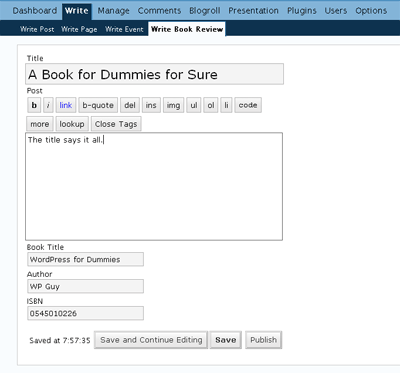
I’m second guessing. No, I think it’ll better if I put the label above each control, instead of currently to the left of the control and right-aligned. Imagine, currently, those controls would shift to the left or right depending on the length of your labels; not the case when you have the label above the control. Hmm.
Also, don’t you think it’s better for the workflow if we can put those buttons (“Save and Continue Editing,” “Save,” and “Publish”) below the custom fields?
Users can write a Description for a custom write panel and for each custom fields associated with it. What do we do then with that information?
Say we want to incorporate them on the interface on the new custom write panel. Where will, precisely, the Description for a custom write panel fit in?
For the custom fields, I could imagine having that question-mark symbol to the right of the control and when users hover the mouse over them, the Description will show.
I’m bored. So here is the list of supported types of custom fields that can be associated for each custom write panel.
* Update: I stroke out Radiobutton from the list because, who wants a control with only one radio button? Such form control just doesn’t make any sense. A Checkbox should be used instead.

A custom write panel is, in essence, a customized Write Post panel. Users will be able to create as many custom write panels as they want, name the new custom write panels as they want, pre-assign a category or more, and display a specified set of custom fields. That is what you can expect from the first release of Custom Write Panel.
Custom Write Panel may have options to display or not display certain Post fields, such as, Categories, Uploads, Post Password and the like, and even hide the original Write Post but that’s of secondary functionality and may not make it to the first release.


Custom Write Panel is another WordPress plugin in the work. It is a plugin that will allow users to create custom write panels, alongside the existing Write Post and Write Page panels.
This custom write panels will appear under the Write panel, as Write Book Review, Write Aside, or Write [fill in the blank]. When a user chooses to write post under, say, Write Book Review, the write screen will be pre-set with the assigned category (Book Review). It will display certain set of custom fields (Book Title, Author, ISBN, etc).
Screenshot coming soon. Follow updates in Custom Write Panel section. For those of you who’ve been using Custom Field GUI, get ready to ditch that plugin.